{
"cells": [
{
"cell_type": "markdown",
"metadata": {},
"source": [
"\n",
"**ATTENTION:** \n",
"CASA versions >=6.6.4 use a new method for obtaining and updating the external data called **casaconfig** [(see API section)](../api/casaconfig.html). \n",
"\n",
"If you installed CASA yourself and it is failing to start up with a message about not finding the necessary data, most users will simply need to run \n",
"```mkdir ~/.casa/data```\n",
"and then re-start CASA. This will give CASA permission to install ~1 GB of data at this location. CASA will automatically keep this data up to date and share it with other current and future CASA releases. To choose a different location for these data, run ```mkdir /data``` and then add ```measurespath=/data``` to the file ~/.casa/config.py.\n",
"\n",
"For further details, please reference the documentation below and the [config.py](../api/casaconfig.html#config-py) section of the casaconfig API. If you did not install CASA yourself and are using CASA at an institution, please notify your system administrator and direct them to this documentation and the [casasiteconfig.py](../api/casaconfig.html#casasiteconfig-py) section of the casaconfig API.\n",
"
"
]
},
{
"cell_type": "markdown",
"metadata": {
"id": "opyy0g0TPNzF"
},
"source": [
"# External Data\n",
"\n",
"Each CASA distribution requires a runtime configuration and minimal repository of binary data for CASA to function properly. This is contained in a casarundata tar file which must be installed before CASA can be used. The data repository includes Measures Tables that deal with the Earth Orientation Parameters (EOPs), reference frames, ephemeris data, antenna configurations, beam models, and calibration corrections. In particular the EOPs include predictions for the near future which drift until they are well determined. The [**casaconfig module**](../api/casaconfig.html) provides functions along with a default configuration file that properly sets up and maintains the data repository contents.\n",
"\n",
"Once an initial data respository is installed **CASA maintains this system automatically**, placing small daily updates of measures data in the *measurespath* location. Occasional updates of the other parts of the data repository are updated as they become available. The default *measurespath* is ~/.casa/data. Site installations of CASA will typically set *measurespath* to a shared location that the site administrators maintain (automatic updates are then turned off by the site administrators). Users may modify or disable this functionality, including adding their own, personally maintained, *measurespath* and controlling which data is automatically updated (all of casarundata or just the measures data) by setting configuration values.\n",
"\n",
"CASA now uses a hierarchy of configuration files. The default configuration values are first set by **config.py** in casaconfig. If a **casasiteconfig.py** is found then that is used next. Finally if the user has a personal **config.py** in ~/.casa then that is used. The full configuration is evaluated by importing **config** from casaconfig.\n",
"\n",
"It is not necessary to set all of the configuration parameters in each of the optional configuration files. The configuration files can consist of any executable python. They should not depend on CASA modules since the configuration must be set before a CASA module can be used.\n",
"\n",
"Monolithic CASA (the casashell module) has command line options that can also be used to change the configuration values. The command line option values always take precedence over any configuration value set in a config file. The location of the user's configuration file can be set on the commandline. The commnad line can be used to skip both the site and user's configuration files.\n",
"\n",
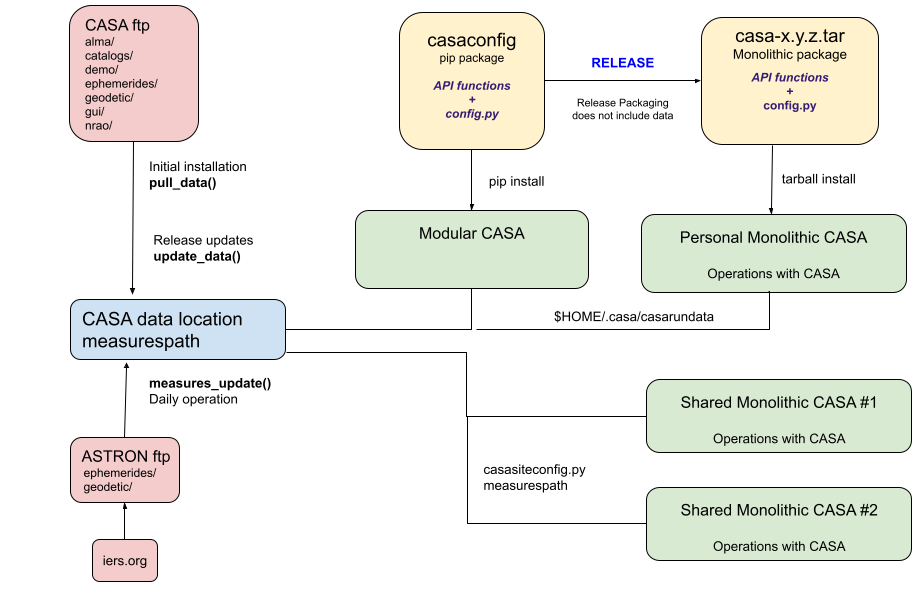
"The following figure depicts a high level view of the external data management system, including the casarundata from CASA, modular pip package and installation, monolothic tarball and installation, and the measures data (from ASTRON).\n",
"\n",
"\n",
"\n",
"\n",
"The following sections illustrate how to manually manipulate data contents. By default, CASA will generally handle this automatically after the initial installation unless the user overrides the settings with their own ~/casa/config.py file.\n",
"\n"
]
},
{
"cell_type": "code",
"execution_count": null,
"metadata": {},
"outputs": [],
"source": [
"# this page contains live examples of casa usage from the following installation\n",
"!pip install casaconfig > /dev/null"
]
},
{
"cell_type": "markdown",
"metadata": {
"id": "ZNn9HVDZ5hzZ"
},
"source": [
"## Locating the Data Directory\n",
"\n",
"The *measurespath* configuration value is used to find the data directory. The default location is ~/.casa/data. Site installations will typically set that to a shared location in a site configuration file found either at the value of a CASASITECONFIG environment variable if set or at /opt/casa/casasiteconfig.py, /home/casa/casasiteconfig.py or a casasiteconfig.py found in the python path (typically in the site-packages directory). An example casasiteconfig.py is provided in casaconfig/private/casasiteconfig_example.py.\n",
"\n",
"The default *measurespath* is ~/.casa/data as seen below. Unless you've previously installed data there this location will not exist."
]
},
{
"cell_type": "code",
"execution_count": null,
"metadata": {
"colab": {
"base_uri": "https://localhost:8080/"
},
"id": "qGSIqBtl77rC",
"outputId": "28ffd78e-74d9-480c-aac6-6ee83d0bdaa7"
},
"outputs": [
{
"name": "stdout",
"output_type": "stream",
"text": [
"/root/.casa/data\n"
]
}
],
"source": [
"# get the configuration and show the value of measurespath\n",
"from casaconfig import config\n",
"print(config.measurespath)"
]
},
{
"cell_type": "code",
"execution_count": null,
"metadata": {
"colab": {
"base_uri": "https://localhost:8080/"
},
"id": "omjQe3yC92Bx",
"outputId": "dc5ecafc-11b4-4cb2-836e-59903dbfa22b"
},
"outputs": [
{
"name": "stdout",
"output_type": "stream",
"text": [
"ls: cannot access '/root/.casa/data': No such file or directory\n"
]
}
],
"source": [
"# see what's in it\n",
"!ls $config.measurespath"
]
},
{
"cell_type": "code",
"execution_count": null,
"metadata": {
"colab": {
"base_uri": "https://localhost:8080/"
},
"id": "-1A3u_R3ZCvR",
"outputId": "879cdb27-6774-4158-8862-98d7734d681d"
},
"outputs": [
{
"name": "stdout",
"output_type": "stream",
"text": [
"True\n",
"True\n"
]
}
],
"source": [
"# the default auto update config values are True (enabled)\n",
"print(config.data_auto_update)\n",
"print(config.measures_auto_update)"
]
},
{
"cell_type": "code",
"execution_count": null,
"metadata": {
"colab": {
"base_uri": "https://localhost:8080/"
},
"id": "FyVaeyg8EmcM",
"outputId": "0afbcb57-2dd3-4dcb-feca-50485b29a74a"
},
"outputs": [
{
"name": "stdout",
"output_type": "stream",
"text": [
"['/usr/local/lib/python3.10/dist-packages/casaconfig/config.py']\n",
"\n"
]
}
],
"source": [
"# see what config files were loaded, in the order they were loaded (in this example, there is just one, the default)\n",
"print(config.load_success())\n",
"# config.load_failure() will contain any errors encountered when loading any of the config files"
]
},
{
"cell_type": "markdown",
"metadata": {
"id": "pxjbmbO1-s8j"
},
"source": [
"## Populating the Data Directory Automatically\n",
"\n",
"It is necessary to first create and populate *measurespath*. The CASA modules will not create *measurespath* to avoid surprises that might arise when more than 800 MB of data are installed to a subdirectory of the user's home directory (~/.casa/data by default).\n",
"\n",
"When CASA starts (when the casatools module is being initialized during import) if *measurespath* exists but is empty, and it is owned by the user, and the auto update values are True then the casaconfig modules will be used to populate *measurespath* automatically.\n",
"\n",
"So for most users the following is sufficient to initially populate *measurespath* (from the OS prompt):\n",
"\n",
"\n",
"```\n",
" mkdir ~/.casa/data\n",
" /casa\n",
"```\n",
"\n",
"The casaconfig module methods will then download the casarundata tarball, install it in ~/.casa/data, download the measures tarball from ASTRON, and update the measures tables that were just installed from the casarundata tarball. Regular CASA use can then continue in the casa session just started. Subsequent uses of casa will check for measures and data updates and install them automaticall if new versions are available. The auto update steps only check for updates once per day. The measures tables are updated daily and the full casarundata tarball is rarely updated (typically at each new CASA release and infrequently between releases as necessary).\n",
"\n",
"The size of the installed data is about 831M. That size may be larger than a user wants to keep in a directory under their home directory. In that case, users should create a personal config file in ~/.casa/config.py (if they don't already have one) and set measurespath to point at that their preferred *measurespath* location. As with the default location, if *measurespath* exists but is empty and owned by the user, starting CASA or importing casatools will populate that location when auto updates are enabled.\n",
"\n",
"```\n",
"# an example config.py setting measurespath\n",
"measurespath = \"/path/to/measurespath\"\n",
"```\n",
"\n",
"Subsequent installations of CASA can continue to use the same measurespath and automatic updates will continue to install the data as it becomes available.\n",
"\n"
]
},
{
"cell_type": "markdown",
"metadata": {
"id": "bGF4-zWw05nD"
},
"source": [
"## Populating the Data Directory Manually\n",
"\n",
"The *measurespath* location may be populated manually. This is how site installations can install and maintain a data directory. Indivual users may also find this useful - especially if they choose to disable auto updates (e.g. to ensure that nothing changes across multiple CASA sessions or while different CASA sessions are running concurrently).\n",
"\n",
"The following live examples use the casaconfig command line. These examples are done through the python prompt so that they can be used in this notebook. Normally these would be done from the OS prompt using the python environment where casaconfig is installed (e.g. \"python3\" in a monolithic CASA installed from a tarball).\n",
"\n",
"The casaconfig command line uses the same config files that normal casa uses. This method does not require that *measurespath* already exist, but it does require that the user be able to create it if it needs to be created or that it has been previously populated by casaconfig.\n",
"\n",
"This example creates the *measurespath* location and populates it with casarundata and the most recent measures data from ASTRON. This example then uses a second casaconfig command line option (current-data) to print out the current version strings of the data installed at *measurespath.*"
]
},
{
"cell_type": "code",
"execution_count": null,
"metadata": {
"colab": {
"base_uri": "https://localhost:8080/"
},
"id": "Rs4t62pF2fJd",
"outputId": "64b0d5e3-1fc6-429e-f135-ed3eef2480d6"
},
"outputs": [
{
"name": "stdout",
"output_type": "stream",
"text": [
"Checking for updates into /root/.casa/data\n",
"pull_data using version casarundata-2025.01.22-1.tar.gz, acquiring the lock ... \n",
"downloading casarundata contents to /root/.casa/data (333M) ... done\n",
"casarundata installed casarundata-2025.01.22-1.tar.gz at /root/.casa/data\n",
"data_update: version installed or checked less than 1 day ago, nothing updated or checked\n",
"measures_update ... acquiring the lock ... \n",
" ... finding available measures at www.astron.nl ...\n",
" ... downloading WSRT_Measures_20250411-160001.ztar from ASTRON server to /root/.casa/data ...\n",
" ... measures data updated at /root/.casa/data\n",
"current data installed at /root/.casa/data\n",
"casarundata version casarundata-2025.01.22-1.tar.gz installed on 2025-04-12\n",
"measures version WSRT_Measures_20250411-160001.ztar installed on 2025-04-12\n"
]
}
],
"source": [
"!python -m casaconfig --update-all\n",
"!python -m casaconfig --current-data"
]
},
{
"cell_type": "markdown",
"metadata": {
"id": "2sA6sAtW2f2f"
},
"source": [
"Use of CASA after this step will not try and update the data. CASA will not check for new versions of the data until 24 hrs after the last check unless the \"force\" option is used (command line or the functional interface show next).\n",
"\n",
"The same *casaconfig* steps can be done from inside a running python session. The following illustrates one way to install and populate that data from python, this time to a custom location (a custom location can also be provided through the measurespath command line argument in the previous example). In order to use this custom location *measurespath* would need to be set to this location in a configuration file or provided through the CASA command line.\n",
"\n",
"**Note:** Some of the measures tables are read when casatools starts. If the tables are updated after that step from a running python session then those changes may not be seen by that already running casatools. If this step happens after CASA has started (or the casatools module has been imported) then that sessions should be exited and restarted to ensure that those data changes are used."
]
},
{
"cell_type": "code",
"execution_count": null,
"metadata": {
"colab": {
"base_uri": "https://localhost:8080/"
},
"id": "hJDIRVNpExxE",
"outputId": "6349ec1c-52ad-4988-a2a2-6006ec1487a2"
},
"outputs": [
{
"name": "stdout",
"output_type": "stream",
"text": [
"pull_data using version casarundata-2025.01.22-1.tar.gz, acquiring the lock ... \n",
"downloading casarundata contents to ./casadata (333M) ... done\n",
"casarundata installed casarundata-2025.01.22-1.tar.gz at ./casadata\n",
"alma\t data_update.lock ephemerides gui readme.txt\n",
"catalogs demo\t\t geodetic\t nrao\n"
]
}
],
"source": [
"from casaconfig import pull_data\n",
"# populate some custom location with the data contents\n",
"pull_data('./casadata')\n",
"\n",
"!ls ./casadata"
]
},
{
"cell_type": "markdown",
"metadata": {
"id": "LC_zralMLSwO"
},
"source": [
"**Note**: If you are using python-casacore directly (outside of CASA), you will need to set your .casarc file to point to wherever you installed casaconfig and/or populated a data folder.\n",
"\n",
"CASA does not use python-casacore so this step is not necessary when using CASA."
]
},
{
"cell_type": "code",
"execution_count": null,
"metadata": {
"colab": {
"base_uri": "https://localhost:8080/"
},
"id": "NrhL8RgGLidD",
"outputId": "402f6e94-dda5-4d6a-8f35-3376f5e6db24"
},
"outputs": [
{
"name": "stdout",
"output_type": "stream",
"text": [
"writing /root/.casarc...\n",
"measures.directory: /root/.casa/data\n"
]
}
],
"source": [
"# tell casacore where to find casaconfig\n",
"from casaconfig import set_casacore_path\n",
"set_casacore_path(config.measurespath)\n",
"!more ~/.casarc"
]
},
{
"cell_type": "markdown",
"metadata": {
"id": "oNpBcSWx1f-a"
},
"source": [
"## Updating the Data Directory\n",
"\n",
"Most of the data tables (such as beam models, antenna and Jy/K correction tables, and the antenna configuration files for the CASA simulator) are versioned by CASA release and seldom change. However, the **Casacore Measures** tables (ie *geodetic* subdirectory) must be updated frequently after release. If the *measures_auto_update* configuration value is True then these updates will happen automatically.\n",
"\n",
"The *get_data_info* function can be used to determine what the installed version of the measures data is, and when it was installed. That information is also found in the readme.txt file located with the measures data (this can also be done for the casarundata)."
]
},
{
"cell_type": "code",
"execution_count": null,
"metadata": {
"colab": {
"base_uri": "https://localhost:8080/"
},
"id": "kPRpxlP29h_i",
"outputId": "ba6b9454-6dda-4fcd-e17a-fbe261373b25"
},
"outputs": [
{
"name": "stdout",
"output_type": "stream",
"text": [
"measures version : WSRT_Measures_20250411-160001.ztar\n",
"measures install date : 2025-04-12\n",
"# measures data populated by casaconfig\n",
"version : WSRT_Measures_20250411-160001.ztar\n",
"date : 2025-04-12"
]
}
],
"source": [
"from casaconfig import get_data_info\n",
"meas_info = get_data_info(type='measures')\n",
"print('measures version : ' + meas_info['version'])\n",
"print('measures install date : ' + meas_info['date'])\n",
"!cat ~/.casa/data/geodetic/readme.txt"
]
},
{
"cell_type": "markdown",
"metadata": {
"id": "xSofTnU7_KdF"
},
"source": [
"The ```measures_update()``` function is used to download new measures data from the originating source. By default, this function will retrieve the latest data. If you already have the latest data, then nothing will happen."
]
},
{
"cell_type": "code",
"execution_count": null,
"metadata": {
"colab": {
"base_uri": "https://localhost:8080/"
},
"id": "UPi_xwWLNF1m",
"outputId": "e2a2bd52-c669-461d-b87a-67be28dc2629"
},
"outputs": [
{
"name": "stdout",
"output_type": "stream",
"text": [
"measures_update: version installed or checked less than 1 day ago, nothing updated or checked\n",
"# measures data populated by casaconfig\n",
"version : WSRT_Measures_20250411-160001.ztar\n",
"date : 2025-04-12"
]
}
],
"source": [
"from casaconfig import measures_update\n",
"measures_update()\n",
"!cat ~/.casa/data/geodetic/readme.txt"
]
},
{
"cell_type": "markdown",
"metadata": {
"id": "ZfA2Yi7e-70d"
},
"source": [
"Specific versions of past measures data can be retrieved as well. This may be important if trying to exactly replicate the conditions of a particular data reduction run in CASA. Generally though the measures data is appended with time, so past and current versions should have the same values at the same points in time (see later section of casacore measures data contents). Functions are provided to list the available versions and for installing specific versions of casarundata."
]
},
{
"cell_type": "code",
"execution_count": null,
"metadata": {
"colab": {
"base_uri": "https://localhost:8080/"
},
"id": "3IW0yLb3JJ_F",
"outputId": "5bc48a10-0ad7-4dc2-f1f6-3344328d2d71"
},
"outputs": [
{
"name": "stdout",
"output_type": "stream",
"text": [
"['WSRT_Measures_20250409-160001.ztar', 'WSRT_Measures_20250410-160001.ztar', 'WSRT_Measures_20250411-160001.ztar']\n"
]
}
],
"source": [
"# show the 3 most recent version of the measures available\n",
"from casaconfig import measures_available\n",
"versions = measures_available()\n",
"print(versions[-3:])"
]
},
{
"cell_type": "code",
"execution_count": null,
"metadata": {
"colab": {
"base_uri": "https://localhost:8080/"
},
"id": "l6DNGCAgANJO",
"outputId": "2b953f62-671b-4a3e-b5e3-f72616b5314b"
},
"outputs": [
{
"name": "stdout",
"output_type": "stream",
"text": [
"measures_update ... acquiring the lock ... \n",
" ... finding available measures at www.astron.nl ...\n",
" ... downloading WSRT_Measures_20250331-160001.ztar from ASTRON server to /root/.casa/data ...\n",
" ... measures data updated at /root/.casa/data\n",
"# measures data populated by casaconfig\n",
"version : WSRT_Measures_20250331-160001.ztar\n",
"date : 2025-04-12"
]
}
],
"source": [
"# retrieve a version from a while back\n",
"measures_update(version=versions[-12])\n",
"!cat ~/.casa/data/geodetic/readme.txt"
]
},
{
"cell_type": "markdown",
"metadata": {
"id": "5lZ1JhxThtbL"
},
"source": [
"**Note: measures_update()** requires that the expected readme.txt file exists at the location being updated. This helps to protect against updating a location that is being maintained outside of the casaconfig methods.\n",
"\n",
"**Note:** when auto updates are enabled (*measures_auto_update* or *data_auto_update* are True) then this step happens each time that CASA is started (during initialization of the casatools module). Auto updates require that the user owns and has write permission for the location being updated in addition to the requirement that the expected readme.txt file exists. This helps to protect against updating a location that is shared by multiple users (e.g. a site *measurespath*). The casaconfig code only looks for new updates at most once per day unless the *force* argument is used.\n",
"\n",
"## Data Locations\n",
"\n",
"There are two configuration values related to where CASA finds the external data described here: *measurespath* and *datapath*.\n",
"\n",
"The *datapath* value is a list of locations to be searched, in order, for the desired data. That value is used by the **resolve()** method of the *utils* tool (*ctsys* in a running CASA environment). The *datapath* value can be changed after CASA starts and the new value will be used in subsequent searches.\n",
"\n",
"The *measurespath* value is used when the casatools module starts to find the location of the IERS tables. Those values are read at that point and used throughout the CASA session. Changing *measurespath* after casatools has started will **NOT** cause the IERS tables at the new location to be used. Updating the IERS tables after casatools has started will not change the IERS values used by that session of CASA. CASA must be restarted to see any changes in the IERS tables.\n",
"\n",
"The default *datapath* has *measurespath* as the first and only element in the list. CASA recommends that measures data be kept at the same location as casarundata and that that location be the first element of *datapath*. Other arrangements may work but are not tested by CASA and may be confusing.\n",
"\n",
"Except for the IERS data as described previously, data used by CASA is read as needed. Changes to non-IERS data after CASA starts may be seen during that CASA session (depending on whether other tools have already read those files). Updates for casarundata are provided infrequently.\n",
"\n",
"Shared data used by one or more installations maintained at a site are typically updated at a time not controlled by a CASA user. Users concerned about that may choose to install their own copy of the data using the casaconfig module methods descrbed here. They should set *measurespath* in their config.py to point to a location of their choosing, and ensure that directory is empty and writable. Typically they will turn on automatic updates so that their installed data is updated as needed when CASA starts but they may choose to not use automatic updates if they run multiple CASA sessions at the same time and they want to ensure that the same data is used for a long-running session, for example."
]
},
{
"cell_type": "markdown",
"metadata": {
"id": "o3ezAGblQHsQ"
},
"source": [
"## Site Installations\n",
"\n",
"Monolithic CASA (distributed in a tarball) may be configured for use by a site where one or more CASA installations are shared by multiple users.\n",
"\n",
"The location of *measurespath* is set in the site configuration file. The site configuration file can be given as the value of a CASASITECONFIG environment variable. If that value is not set then it is found in any of the following locations (the first location found will be the one used):\n",
"\n",
"\n",
"* /opt/casa/casasiteconfig.py\n",
"* /home/casa/casasiteconfig.py\n",
"* A casasiteconfig.py at any location in the python path (e.g. the site-packages directory).\n",
"\n",
"Site managers should choose the location (or CASASITECONFIG value) that is most convenient for them.\n",
"\n",
"**Note:** If CASASITECONFIG is set but a file does not exist at that location then a warning message will be printed and the configuration will proceed without using any site configuration file. The CASASITECONFIG value must be a fully qualified path.\n",
"\n",
"The CASA distribution comes with an example site configuration file at private/casasiteconfig_example.py of the casaconfig module.\n",
"\n",
"This is what the example site configuration file looks like\n",
"```\n",
"# An example site config file.\n",
"# Place this in a location checked by casaconfig :\n",
"# /opt/casa/casasiteconfig.py\n",
"# /home/casa/casasiteconfig.py\n",
"# the environment value CASASITECONFIG - use the fully qualified path\n",
"# anywhere in the python path, e.g. the site-packages directory in the CASA being used.\n",
"#\n",
"\n",
"# This file should be edited to set measurespath as appropriate\n",
"\n",
"# Set this to point to the location where the site maintained casarundata can be found\n",
"# by default datapath will include measurespath\n",
"\n",
"measurespath = \"/path/to/installed/casarundata\"\n",
"\n",
"# turn off all auto updates of data\n",
"\n",
"measures_auto_update = False\n",
"data_auto_update = False\n",
"```\n",
"Once *measurespath* has been set in the site configuration file the location must be populated to contain the expected data using the methods previously described. The same data installed at *measurespath* can be used by multiple installations (and a single site configuration file can be used by multiple CASA installations). Note that auto updates are False here so that users don't attempt to update the site *measurespath* when they start CASA. The auto update mechanism also checks that the user is the owner of *measurespath* and has write permission before any attempt to update it is made. An error is printed and CASA continues starting if *measurespath* can not be updated when either auto update is True.\n",
"\n",
"## Legacy Data\n",
"\n",
"Sites with older installations that already have CASA data shared across multiple CASA installations can use the same data location and update methods that they have been using (e.g. the casadata python module or a clone of the casa-data git repository).\n",
"\n",
"In that case, the site would need a site configure file where the *measurespath* is set to the location of this data and auto updates are False. The site would continue to maintain that data independent of the casaconfig methods described here. The version information printed by the \"--current-data\" casaconfig command line option or available through the *get_data_info* function will be \"unknown\" for a legacy data installation and the casaconfig data functions will not install any data into such a location.\n",
"\n",
"If this legacy update mechanism is used be aware that CASA is no longer distributed with a **data** or **\\_\\_data\\_\\_** directory internal to the distribution so replacing that with a link to the site location is no longer necessary and doing that will not allow that installation of CASA to find the data. The *measurespath* **must** indicate where the CASA data can be found.\n",
"\n",
"Be aware that the **update-data** script is no longer provided by casa although existing **update-data** scripts found with previous versions of casa should continue to work and the resulting updated data can be used with this version of casa provided a *measurespath* is set appropriately.\n",
"\n",
"## Reference Testing\n",
"\n",
"Testing may require that the casarundata be set to a known version. Monolithic CASA is packaged with information that casaconfig can use to set the casarundata to the version at the time that that release was set. The **casaconfig** command line *--reference-testing* argument can be used to set the data at *measurespath* to that version. It is intended for internal testing only. This sets the data at *measurespath* to what it would have been had CASA been packaged with data at the time that version of CASA was released. This includes the measures data at that date (i.e. the measures data will be out of date, which can be useful for testing). The reference-testing version information is only known to monolithic casa installations.\n",
"\n",
"**Note:** This option changes the contents at *measurespath*.\n",
"\n",
"A user doing testing may not wish to change the *measurespath* that they use regularly or for their personal data reduction. CASA recommends that people doing reference testing have a separate config file (e.g. test_config.py) which sets *measurespath* to a location for the test data. That configuration file can be used at any command line (casaconfig and casa) with the configfile option. So, for example, one could do the following to start casa using a test_config.py in their ~/.casa directory:\n",
"\n",
"```\n",
"$ casa --configfile ~/.casa/test_config.py --reference-testing\n",
"```\n",
"If the *measurespath* set in that test_config.py exists and is empty or was previously populated by casaconfig then this line will make sure that the versions of data installed there match what the reference versions are for this tarball and install them if necessary before CASA continues.\n",
"\n",
"**Note:** If the casarundata version is the expected reference version but the measures version is different (e.g. it's more recent because auto updates have happened) then casaconfig will re-install that casarundata version (which has the correct measures version) and not update any measures data after that.\n",
"\n",
"Reference testers will typically turn off auto updates in the test config file being used so that subsequent CASA uses do not automatically update the data (auto updates will not happen in any event for 24 hrs after the reference data is installed because casaconfig will not check for updates during that time)."
]
},
{
"cell_type": "markdown",
"metadata": {
"id": "xxv4utFAnU37"
},
"source": [
"## Data Directory Contents"
]
},
{
"cell_type": "markdown",
"metadata": {
"id": "sppg8uqtPNzP"
},
"source": [
"### Casacore Measures\n",
"\n",
"The casacore Measures tables are needed to perform accurate conversions of reference frames. Casacore infrastructure includes classes to handle physical quantities with a reference frame, so-called *Measures*. Each type of Measure has its own distinct class in casacore which is derived from the Measure base class. One of the main functionalilties provided by casacore w.r.t. Measures, is the conversion of Measures from one reference frame to another using the MeasConvert classes.\n",
"\n",
"Many of the spectral, spatial, and time reference frames are time-dependent and require the knowledge of the outcome of ongoing monitoring measurements of properties of the Earth and astronomical objects by certain service observatories. This data is tabulated in a number of tables (*Measures Tables*) which are stored in the casadata repository in the subdirectory ```geodetic```. A weekly snapshot of this repository is included in each casarundata tarball.\n",
"\n",
"Measures tables are updated daily based on the refinement of the geodetic information from the relevant services like the International Earth Rotation and Reference Systems Service (IERS). Strictly speaking, the Measures tables are part of the casacore infrastructure which is developed by NRAO, ESO, NAOJ, CSIRO, and ASTRON. In order to keep the repository consistent between the partners, the Measures tables are initially created at a single institution (ASTRON) and then copied into the NRAO casadata repository from which all CASA users can retrieve them. As of March 2020, the update of the NRAO CASA copy of the Measures tables in ```geodetic``` and the planetary ephemerides in directory ```ephemerides``` takes place every day between 18 h UTC and 19 h UTC via two redundant servers at ESO (Garching). For CASA versions containing the new casaconfig module (>=6.6.4), Measures tables may now also be retrieved directly from ASTRON using the method casaconfig.measures_update().\n",
"\n",
"**The data repository needs to be updated with recent Measures tables** (see [above](#Updating-the-Data-Directory)). For observatory use, the update period should not be longer than weekly in order to have the EOPs up-to-date for upcoming observations. The shortest reasonable update interval is daily. For offline data analysis use, the update period should not be longer than monthly. Weekly update is recommended.\n",
"\n",
"Legacy installations processing old data do not have to be updated because the relevant contents of the Measures Tables is not changing any more for the more distant past.\n",
"\n",
"The following list describes the individual Tables in subdirectory ```geodetic```:\n",
"\n",
"* **IERSeop2000:** The IERS EOP2000C04_05 Earth Orientation Parameters\n",
"using the precession/nutation model \\\"IAU2000\\\" (files eopc04_IAU2000.xx)\n",
"* **IERSeop97**: The IERS EOPC04_05 Earth Orientation Parameters using the precession/nutation model \\\"IAU 1980\\\" (files eopc04.xx)\n",
"* **IERSpredict:** IERS Earth Orientation Data predicted from NEOS (from file )\n",
"* **IGRF:** International Geomagnetic Reference Field Schmidt [semi-normalised spherical harmonic coefficients](https://www.ngdc.noaa.gov/IAGA/vmod/coeffs/). (Note that this still uses IGRF12. An update to IGRF13 is underway.)\n",
"* IMF (not a Measures Table proper, access not integreated in Measures framework): Historical interplanetary magnetic field data until MJD 52618 (December 2002).\n",
"* KpApF107 (not a Measures Table proper, access not integreated in Measures framework): Historical geomagnetic and solar activity indices until MJD 54921 (April 2009)\n",
"* **Observatories:** Table of the official locations of radio observatories. Maintained by CASA.\n",
"* SCHED_locations (not a Measures Table proper, access not integreated in Measures framework): VLBI station locations\n",
"* **TAI_UTC:** TAI_UTC difference (i.e. leap second information) obtained from USNO\n",
"\n",
"\n",
"Measures Tables in the directory ```ephemerides```:\n",
"\n",
"* **DE200**: Historical JPL Planetary ephemeris DE200 used for Astronomical Almanach from 1984 to 2003 (from )\n",
"* **DE405**: JPL Planetary ephemeris DE405; includes nutations and librations; referred to the ICRS (from )\n",
"\n"
]
},
{
"cell_type": "markdown",
"metadata": {
"id": "-b51ThM4PNzT"
},
"source": [
"### Ephemeris Data\n",
"\n",
"The ephemeris tables hold a selection of the solar system objects from JPL-Horizons database. The data tables are generated from the JPL Horizons system\\'s on-line solar system data and ephemeris computation service ([https://ssd.jpl.nasa.gov/?horizons )](https://ssd.jpl.nasa.gov/?horizons \"JPL Horizons\"). These are primarily used to determine flux models for the solar system objects used in the **setjy** task. These tables are stored as CASA tables in the casadata repository under ```ephemerides/JPL-Horizons```. The current ephemeris tables cover ephemerides until December 31, 2030 for those objects officially supported in **setjy**.\n",
"\n",
"Available objects, which include major planets, satellites, and asteroids, are: Mercury, **Venus**, **Mars**, **Jupiter**, Saturn, **Uranus**, **Neptune**, Pluto, **Io**, **Europa**, **Ganymede**, **Callisto**, **Titan**, **Ceres**, **Vesta**, **Pallas**, **Juno**, **Lutetia**, Sun and Moon (the objects in **bold** are those supported in \\'Butler-JPL-Horizons 2012\\' standard in **setjy**.).\n",
"\n",
"The format of the table name of these tables is *objectname*\\_*startMJD*\\_*endMJD*\\_J2000.tab These tables required by **setjy** task are included in the data directory in the CASA distribution. The available tables can be listed by the following commands:\n",
"\n",
"\n",
"```\n",
"#In CASA6\n",
"\n",
"CASA <1>: import glob\n",
"\n",
"CASA <2>: jpldatapath = ctsys.resolve('ephemerides/JPL-Horizons') + \"/*J2000.tab\"\n",
"\n",
"CASA <3>: glob.glob(jpldatapath)\n",
"```\n",
"\n",
"The following data are retrieved from the JPL-Horizons system (the nubmer in the parentheses indicates the column number listed in the JPL-Horizons system). One should refer https://ssd.jpl.nasa.gov/?horizons_doc for the detailed descreption of each of these quantities.\n",
"\n",
"Quantities | column no. | Unit/format | Descrition | column label\n",
"--- | --- | --- | --- | ---\n",
"Date | n.a. | YYYY-MM-DD | HH:MM | Date\\_\\_(UT)\\_\\_HR:MN\n",
"Astrometric RA & DEC | 1 | degrees | Astrometric RA and Dec with respect to the observer\\'s location (GEOCETRIC) | R.A.\\_(ICRF)\\_DEC\n",
"Observer sub-long& sub-lat | 14 | degrees | Apparent planetodetic (\\\"geodetic\\\") longitude and latitude of the center of the target seen by the OBSERVER at print-time | ob-lon, ob-lat\n",
"Solar sub-long & sub-lat | 15 | degrees | Apparent planetodetic (\\\"geodetic\\\") longitude and latitude of the Sun seen by the OBSERVER at print-time | Sl-lon, Sl-lat\n",
"North Pole Pos. ang. & dist. | 17 | degrees and arcseconds | Target\\'s North Pole position angle and angular distance from the \\\"sub-observer\\\" point | NP.ang, NP.ds\n",
"Helio range & range rate | 19 | AU, km/s | Heliocentric range (r) and range-rate (rdot) | r, rdot\n",
"Observer range & range rate | 20 | AU, km/s | Range (delta) and range-rate (deldot) of the target center with respect to the observer | delta, dedot\n",
"S-T-O angle | 24 | degrees | Sun-Target-Observer angle | S-T-O\n",
"\n",
"The task **getephemtable** can be used to retrieve the ephemeris data from the JPL-Horizons system through its web service and convert a CASA table. (See also [Manipulate Ephemeris Objects page](ephemeris_data.ipynb#Manipulate-Ephemeris-Objects \"Manipulate Ephemeris Objects\")).\n",
"\n",
"\n",
"```\n",
"CASA <5>: getephemtable(objectname='Titan', timerange='2020/01/30~2020/01/31', interval='15m', outfile='Titan_test_ephem.tab')\n",
"\n",
"```\n",
"The converted table contains following columns. Note that required columns by Measures, which is used to read the epehemeris table in CASA are MJD, RA, DEC, Rho, and RadVel. Other extra columns are added for use in **setjy** task. \n",
"\n",
"Column name | unit/format | description\n",
"--- | --- | ---\n",
"MJD | day | modified Julian date\n",
"RA | degree | astrometric right acension in ICRS frame\n",
"DEC | degree | astrometric declination in ICRS frame\n",
"Rho | AU | Geocentric distance\n",
"RadVel | AU/d | Geocentric distance rate\n",
"NP_ang | degree | North pole position angle\n",
"NP_dist | degree | North pole angular distance\n",
"DiskLong | degree | Sub-observer longitude\n",
"DiskLat | degree | Sub-observer latitude\n",
"Sl_lon | degree | Sub-Solar longitude\n",
"Sl_lat | degree | Sub-Solar latitude\n",
"r | AU | heliocentric distance\n",
"rdot | km/s | heliocentric distance rate\n",
"phang | degree | phase angle\n",
"\n",
"\n"
]
},
{
"cell_type": "markdown",
"metadata": {
"id": "dbT5e3_9PNzV"
},
"source": [
"### Array Configuration\n",
"\n",
"Array configuration files for various telescopes are distributed with each CASA release. These configuration files can be used to define the telescope for simulator tools and tasks. Currently, configuration files for the following telescopes are available in CASA:\n",
"\n",
"- ALMA / 12m Array\n",
"- ALMA / 7m ACA\n",
"- VLA\n",
"- VLBA\n",
"- Next-Generation VLA (reference design)\n",
"- ATCA\n",
"- MeerKat\n",
"- PdBI (pre-NOEMA)\n",
"- WSRT\n",
"- SMA\n",
"- Carma\n",
"\n",
"The full list of antenna configurations can be found in the [CASA Guides](https://casaguides.nrao.edu) under Simulations.\n",
"\n",
"One can also locate the directory with the configurations in the data repository and then list the configuration files, using the following commands in CASA:\n",
"\n",
"```\n",
"CASA <1>: print(ctsys.resolve('alma/simmos/'))\n",
"/home/casa/data/distro/alma/simmos/\n",
"\n",
"CASA <2>: ls /home/casa/data/distro/alma/simmos/\n",
"```\n",
"\n",
"If a configuration file is not distributed with the data repository but retrieved elsewhere, then the configuration file can be called by explicitly writing the full path to the location of the configuration file in the antennalist paramter of the simulator tasks.\n",
"\n",
"\n",
"**NOTE**: the most recent ALMA configuration files may not always be available in the most recent data repository. ALMA configuration files for all cycles are available for download [here](https://almascience.nrao.edu/tools/casa-simulator). For the Next-Generation VLA reference design, the latest information can be found [here](https://ngvla.nrao.edu/page/tools).\n",
"
\n"
]
}
],
"metadata": {
"colab": {
"name": "external-data.ipynb",
"provenance": []
},
"kernelspec": {
"display_name": "Python 3",
"language": "python",
"name": "python3"
},
"language_info": {
"codemirror_mode": {
"name": "ipython",
"version": 3
},
"file_extension": ".py",
"mimetype": "text/x-python",
"name": "python",
"nbconvert_exporter": "python",
"pygments_lexer": "ipython3",
"version": "3.8.3"
}
},
"nbformat": 4,
"nbformat_minor": 0
}